DMARC monitoring for MSPs, resellers and agencies
Stop fake email in your clients' names. Safely.
AtrioDMARC reads the DMARC reports that Google, Microsoft and other mail providers send every day and turns them into plain words: who sends email as each domain, what is fake, what to fix, and when it is safe to move from watching to blocking.
- $1.49 per domain a month, published
- Included with a paid Atriomail mailbox
- Client reports under your brand
Is your domain protected?
A free check of a domain's DMARC and SPF records, in plain words. No sign-up.
Your browser asks public DNS directly. We store nothing.
Why it matters now
Gmail, Yahoo and Outlook.com now check DMARC. Most domains are not ready.
Since February 2024, Gmail and Yahoo require a DMARC record from anyone sending them 5,000 or more emails a day. Since May 2025, Outlook.com applies the same rule. Most small businesses publish a record once, leave it on "watch only" and never read a single report.
Fake invoices still arrive
A DMARC record set to p=none only watches. Anyone can still send email that claims to be your client, and it reaches inboxes.
The reports are unreadable
Mail providers send a compressed XML file every day. Nobody opens them, so nobody knows whether the newsletter tool or the shop sends correctly.
Tightening is a guess
Move to p=reject too early and real invoices bounce. Then your client calls you. So most domains stay on watch only, forever.
Sources: Google's email sender guidelines and FAQ, Yahoo's sender requirements, and Microsoft's announcement of April 2025 for Outlook.com, all checked November 2026. Read what each one requires.
One status, in plain words
Every domain gets one of three answers.
The technical details sit in a folded section for the IT person. Everything above it is written for the business owner.
How it works
One switch, one record, then plain words.
Nothing in DNS changes without your click, and switching monitoring on or off does not change how email is delivered.
Switch it on
Open the domain's Email protection page in the control panel. For a domain hosted elsewhere, add it under "DMARC for other domains".
Publish one record
Add the DMARC record the page shows, or click "Publish the record" on a connected Cloudflare or Namecheap account. It keeps the domain's current policy.
Read it in plain words
The first reports usually arrive within a day or two. You see who sends email as the domain and what is not recognised.
Tighten when it is safe
With enough data, the page says whether the domain can move to spam or block, and what that step would have done to the last 30 days of mail.
Inside AtrioDMARC
What you and your clients see.
Real screenshots of the Email protection pages in the control panel, with demo domains and 28 days of demo reports. Captured November 2026.
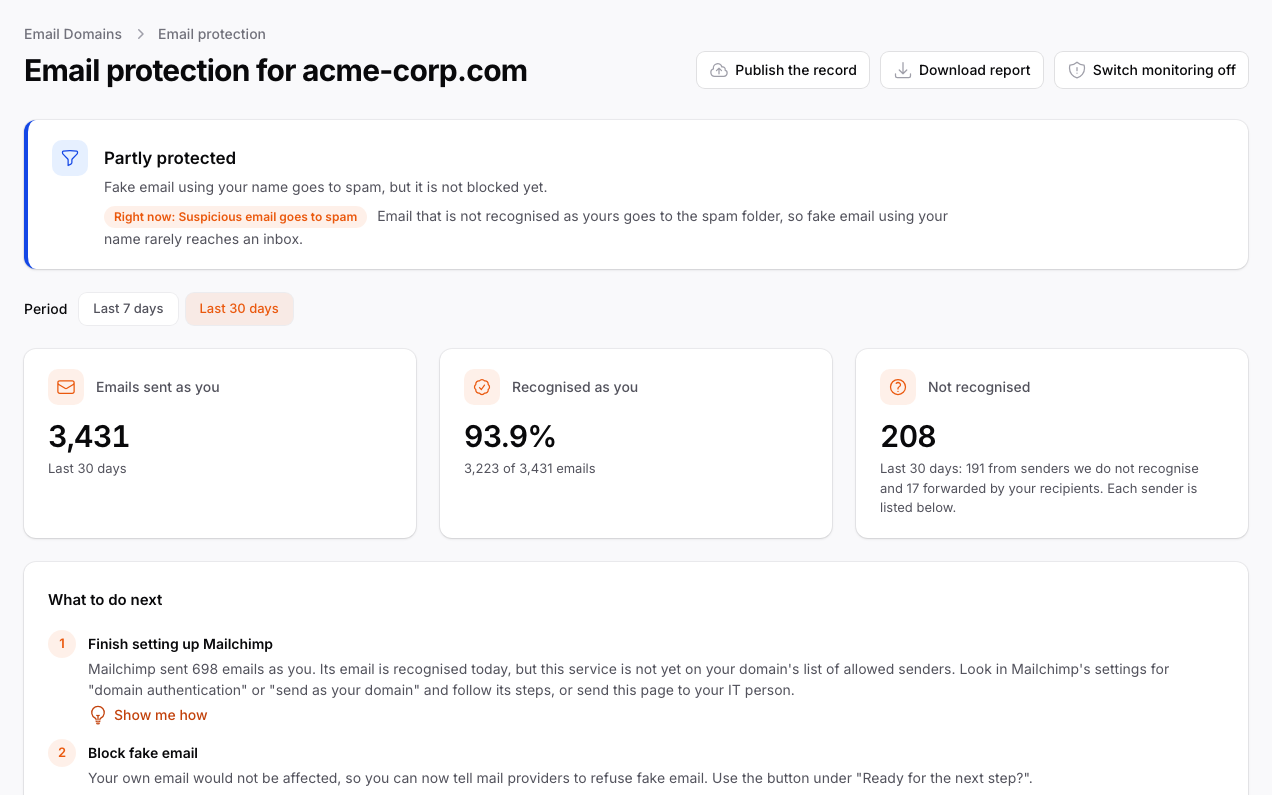
The answer first
A status in plain words, then three numbers for the last 7 or 30 days: emails sent as the domain, how many were recognised as its own, and how many were not. Then at most two next steps.
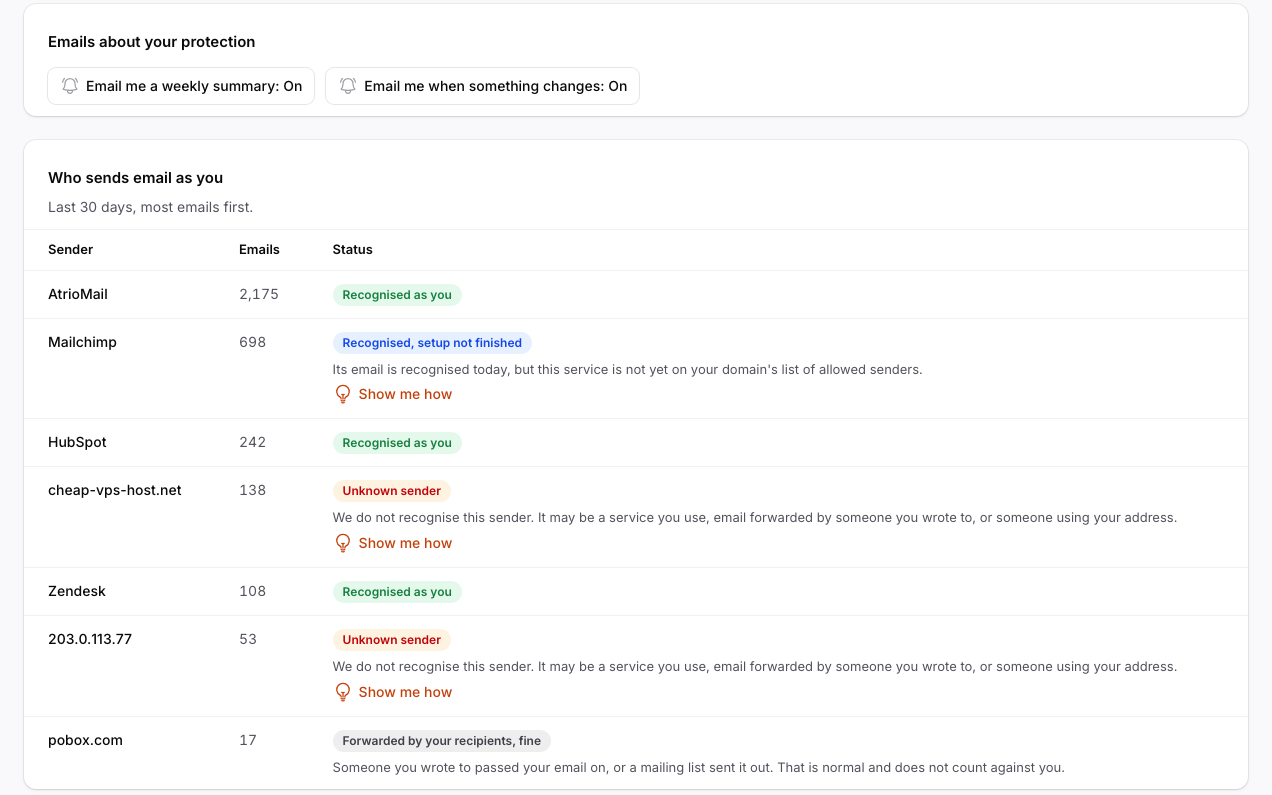
Every sender, by name
Each service that sends as the domain, most emails first, with a plain label. Mail forwarded by people your client wrote to is labelled "Forwarded by your recipients, fine" and never counts against them.
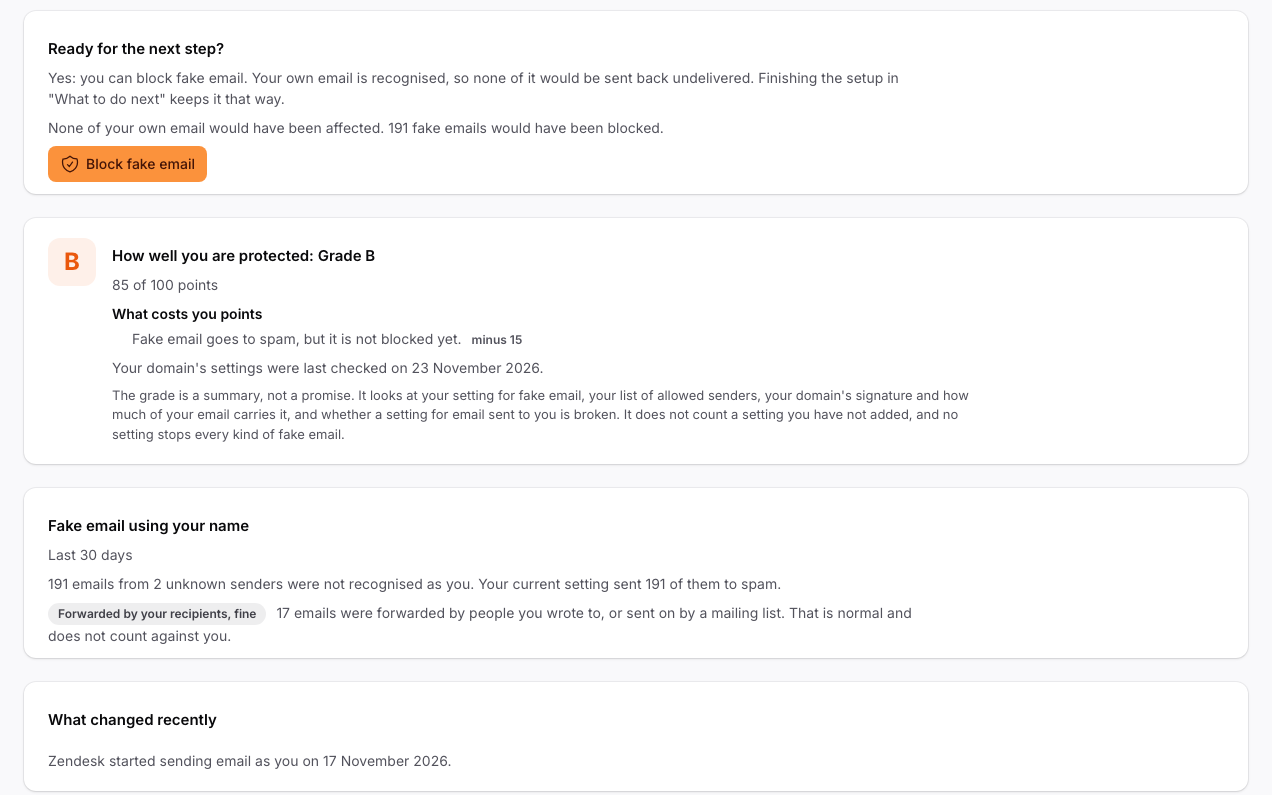
Safe to tighten? Yes or not yet
Once there are 14 days of reports from at least 2 mail providers covering 100 emails, the page says whether the next step is safe and what it would have done: your own emails sent to spam or back, and fake emails stopped. Plus an A to F grade with every lost point explained.
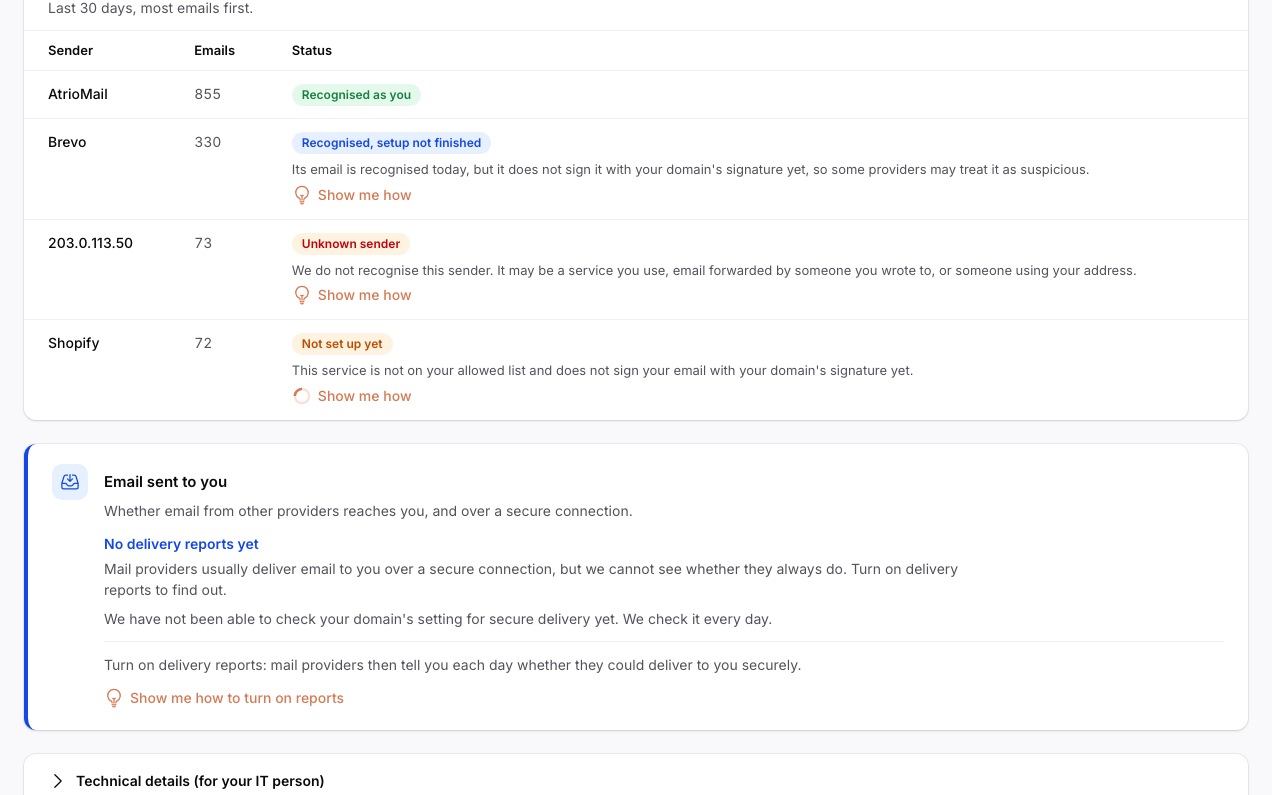
Never a problem without its fix
A step-by-step guide for 30 named services such as Google Workspace, Microsoft 365, Mailchimp, HubSpot, Zendesk and Shopify. "Check again" ticks each record off, and "Send to my IT person" emails the same steps.
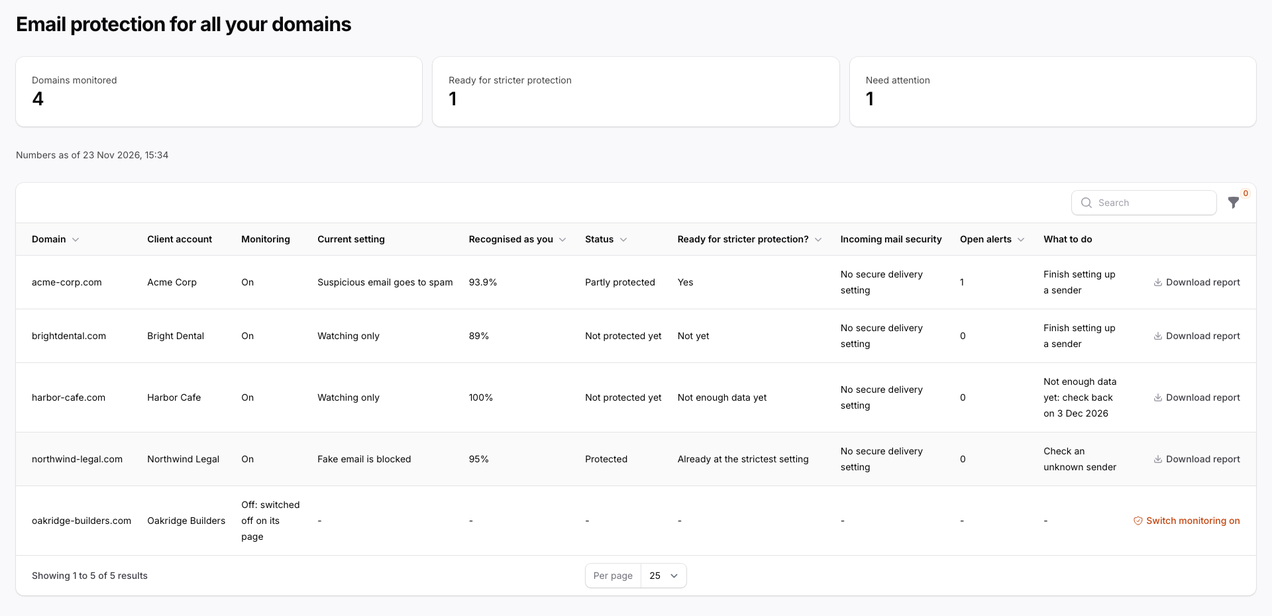
Every client domain on one page
Monitoring on or off, the current setting, the share of email recognised, the status, readiness and open alerts, with filters for "needs attention", "ready for stricter protection" and "monitoring off".
For MSPs and resellers
Turn DMARC into a service your clients can see.
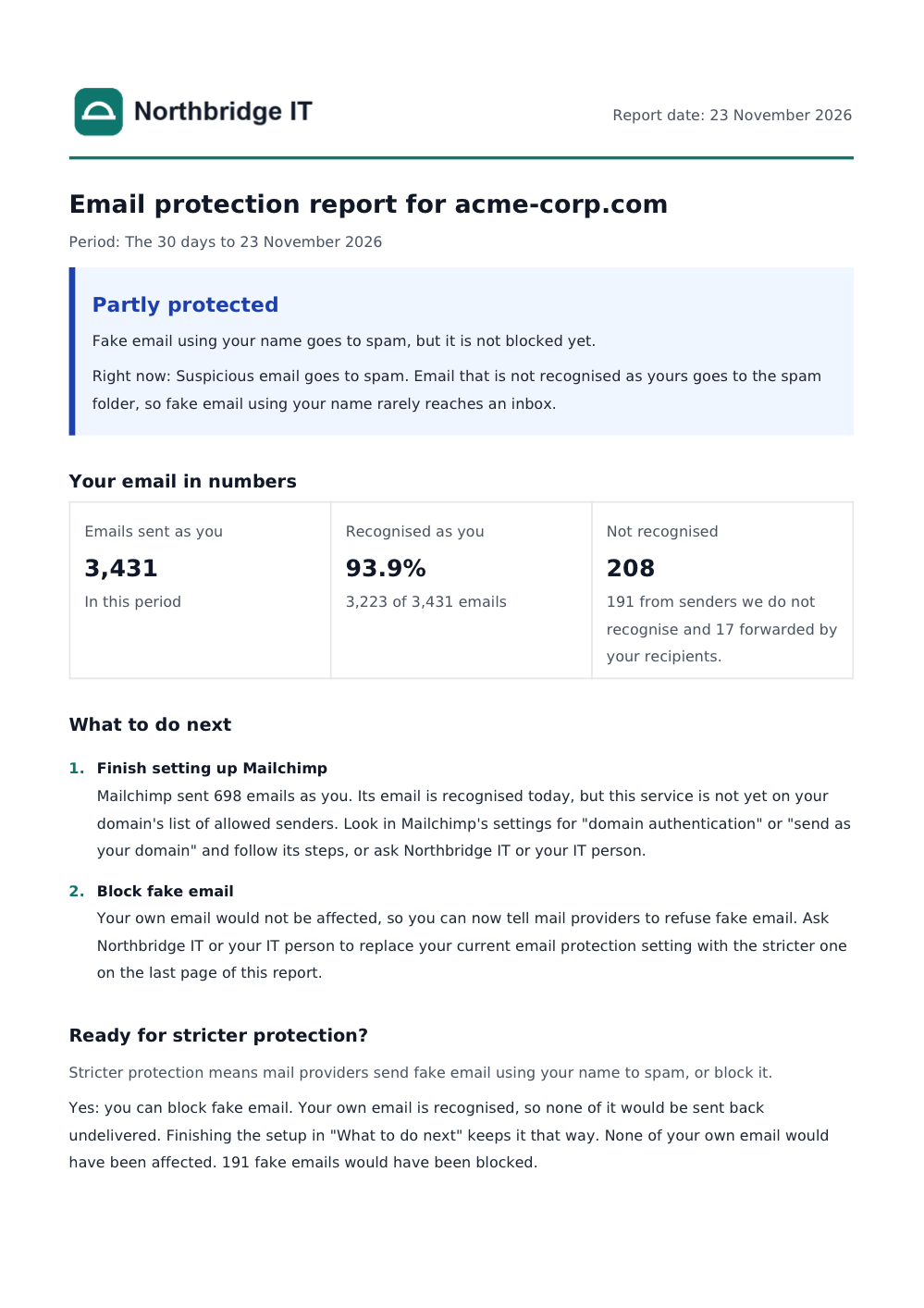
Your clients see their domain's page on your branded hostname. You get the alerts. And once a month you hand them a PDF in your colours.
- A PDF report of the last 30 days with your white-label name, logo and colour, never ours
- A weekly summary and alerts go to you, not to your clients
- Only the account that pays can switch on a paid service, so a client cannot add a charge to your invoice
- You set your own price. We charge $1.49 a domain
Pricing
One published price per domain. Nothing to quote.
No plans, no email-volume tiers, no annual contract. It sits on your monthly invoice, and a reseller pays for its clients' domains.
Domain with a paid mailbox
DMARC monitoring
For a domain whose email is with Atriomail and has a paid mailbox ($1.39 per mailbox a month).
Domain hosted elsewhere
DMARC monitoring
Email stays where it is: Google Workspace, Microsoft 365 or anywhere else. Nothing is charged until the record is found.
SPF sender list
Kept under 10 lookups
Offered when a domain's SPF needs 9 or more of the 10 DNS lookups mail providers allow.
Secure delivery (MTA-STS)
Hosted for you
For a domain whose email is with Atriomail and whose mail servers all point at us.
Compare
What 10 domains cost a month.
The cheapest published plan for 10 domains that send email. None of the four publishes a price for MSPs.
| Provider | 10 domains a month | How the price is set |
|---|---|---|
| AtrioDMARC | $14.90 if all 10 are hosted elsewhere. Included for each one with a paid mailbox | Per domain, monthly, no volume limit |
| EasyDMARC | Not published. Premium covers 4 domains; beyond that, a quote | Plans by domains and email volume |
| DMARC Advisor | €499 billed yearly (Enterprise), or €199 if no more than 8 send email (Plus) | Plans by sending domains and email volume, yearly |
| dmarcian | $499 billed yearly (Enterprise), or $199 if no more than 8 are active (Plus) | Plans by active domains and email volume |
| PowerDMARC | Not published. Basic covers 5 domains; beyond that, a quote | Plans by domains and compliant email volume |
From each company's own pricing page, checked 29 November 2026, in its own currency. Prices change, so check their pages before you decide. See the full comparison, including where they go further.
Everything in the box
DMARC, SPF, secure delivery and BIMI, in one place.
A grade from A to F
Out of 100 points, with a plain list of what costs points. A summary, never a guarantee.
Weekly summary and alerts
When a new sender appears, one stops being recognised, or less email passes. Checked once a day.
SPF kept short
A long sender list kept under the 10-lookup limit, refreshed every 30 minutes. $0.89 a domain.
Secure delivery (MTA-STS)
Hosted and kept up to date for domains whose email is with us, with delivery reports (TLS-RPT).
An API for your portal
Read every domain's protection, register domains and publish records from your own portal or billing system.
BIMI In progress
Your client's logo beside their email in supporting inboxes. We are building the BIMI check and guidance now.
FAQ
Questions about AtrioDMARC.
What is AtrioDMARC?
AtrioDMARC is DMARC monitoring built into the Atriomail control panel, where the page is called Email protection. It reads the daily DMARC aggregate reports that mail providers send about a domain and shows, in plain words, who sends email as the domain, what is not recognised, what to fix and when it is safe to tighten the domain's DMARC policy.
How much does AtrioDMARC cost?
$1.49 per domain per month for a domain whose email is hosted elsewhere, or a domain with Atriomail that has no paid mailbox. It is included for a domain with a paid Atriomail mailbox ($1.39 per mailbox per month). Keeping a domain's SPF sender list short is $0.89 per domain per month. Prices are in US dollars.
Can I monitor a domain whose email is with Google Workspace or Microsoft 365?
Yes, for $1.49 per domain per month. The domain's email stays where it is and its delivery does not change. You add one DNS record, and monitoring starts once the record is found. Nothing is charged before that.
Will switching on monitoring change how email is delivered?
No. Switching monitoring on or off does not change how email is delivered, and nothing in DNS changes without your click. The new DMARC record keeps the domain's current policy.
Is there a free trial?
There is no free trial. Creating an account is free and needs no card, and the DMARC checker, SPF checker and record generator on this site are free with no sign-up. For a domain hosted elsewhere, nothing is charged until its record is found.
Does AtrioDMARC support BIMI?
BIMI is in progress. We are building it as the last step of the DMARC flow: once a domain blocks fake email, AtrioDMARC will check what else a logo in the inbox needs. It is not available yet.
See who sends email as your clients' domains.
Creating an account is free and needs no card. Monitoring is included with every domain that has a paid mailbox, and $1.49 a month for any other domain.